It's PineTime!

How it started
Over summer break, I was participating in an event called "Arcade" by Hack Club. This event gave you tickets for time you spent creating open source personal projects, it was AWESOME! I got 450+ tickets and redeemed cool prizes like a Raspberry Pi Zero 2W, 10 year domain, a MacBook Air, and of course, a PineTime!

I was super excited to get my hands on the PineTime, an open-source smartwatch, as my last smartband (Wyze Band) died a while back. When I contacted Wyze's support, they said they discontinued the band and just gave me $15 in store credit. I didn't want to spend money on another smartband and used my Casio watch for a while. But now, I had a PineTime, and I was ready to make it my daily driver!
First Impressions
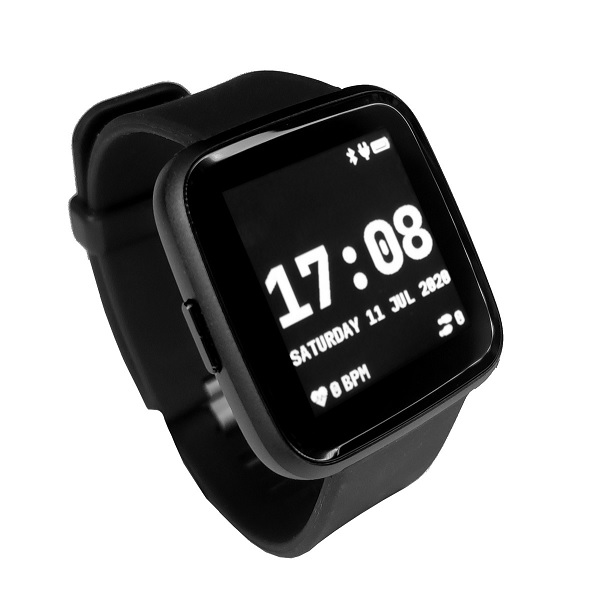
The PineTime seemed like a great smartwatch for the price it's sold for. It has a 1.3" IPS display, a 180mAh battery, and a Nordic nRF52832 SoC. It was running InfiniTime, an open-source firmware for the PineTime. Using the watch felt nice, the software felt swift. Although it didn't have much animations, it was bloatfree and all the included apps worked without slowdowns. Many of the users on the Disord community were talking about how much they enjoy their watch and how it has all the features they need, like notifications, weather, and more.
The Problem
Some of the features I was looking forward to semed to be missing from my watch. One of the features I really missed during my time with a regular watch was the ability to quickly see phone notifications from my watch, but my PineTime didn't seem to have that feature. I also wanted some app that helped with sleep tracking, but the included apps didn't have that feature either.
It turns out, phone notifications were not working because I was using iOS. The InfiniTime firmware only supported Android for notifications. When I looked into the sleep tracking app, I found that there wasn't any app in the firmware yet. I was a bit disappointed, but I had the power to fix make my new watch better and add the features I wanted! That's the power of open-source!
Upgrade Time!
Eager to make my watch better, I started looking into the InfiniTime codebase, aaaaaaannd I was lost. The codebase was huge and I didn't know where to start. I knew that if I wanted to get a handle on this, I would need to start off small and expand from there. I was wondering what small change I could do to learn the ropes of the firmware's codebase. That's when I remembered someone I knew with an Apple Watch. Their Apple Watch had a flashight mode with a red light mode for night time. The Infinitime firmware also had a flashlight mode, but it only had a white light mode.
Making a Red Light Mode
Looking at the code for the flashlight app showed me a lot of structure that the code for apps followed. With a little help from GitHub Copilot, I was able to understand LVGL, the graphics library used in the firmware, and how to add a new button to the flashlight app. I added a button to toggle between white and red light modes, and it worked! I was able to make a change to the firmware and see it work on my watch. I was so excited to see my change work, and I was ready to add more features to the firmware!
The Sleep App